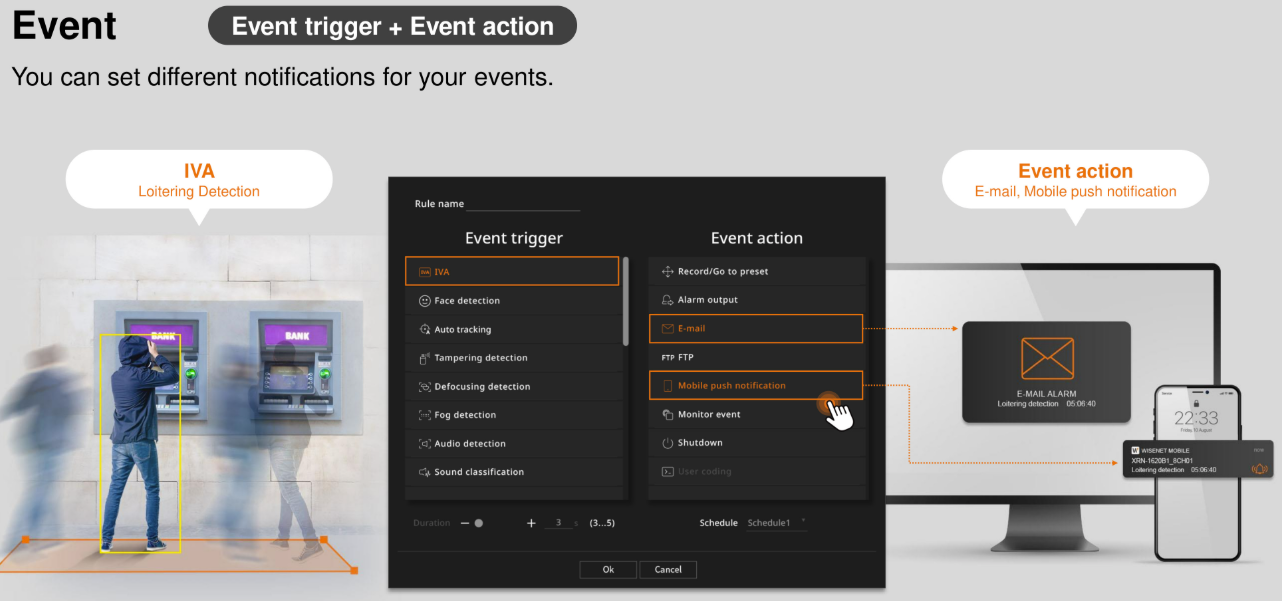
1. The event engine: triggers → actions
Cameras and recorders ship with a rules engine that connects triggers to actions — no custom programming required.
Triggers
Motion · AI analytics events (IVA rules) · face detection · audio detection · tampering · shock · video loss · network events · alarm inputs (door contacts, sensors) · schedules/timers
Actions
Alarm output relay (sirens, strobes, gates) · email (SMTP) · FTP upload of the event clip · HTTP request to a third-party system · start/change recording · PTZ preset go-to (turn to the door when it opens) · audio clip playback (deterrence message) · light alarm
In the WAVE layer, operators add manual soft-trigger buttons on top of the automatic rules.
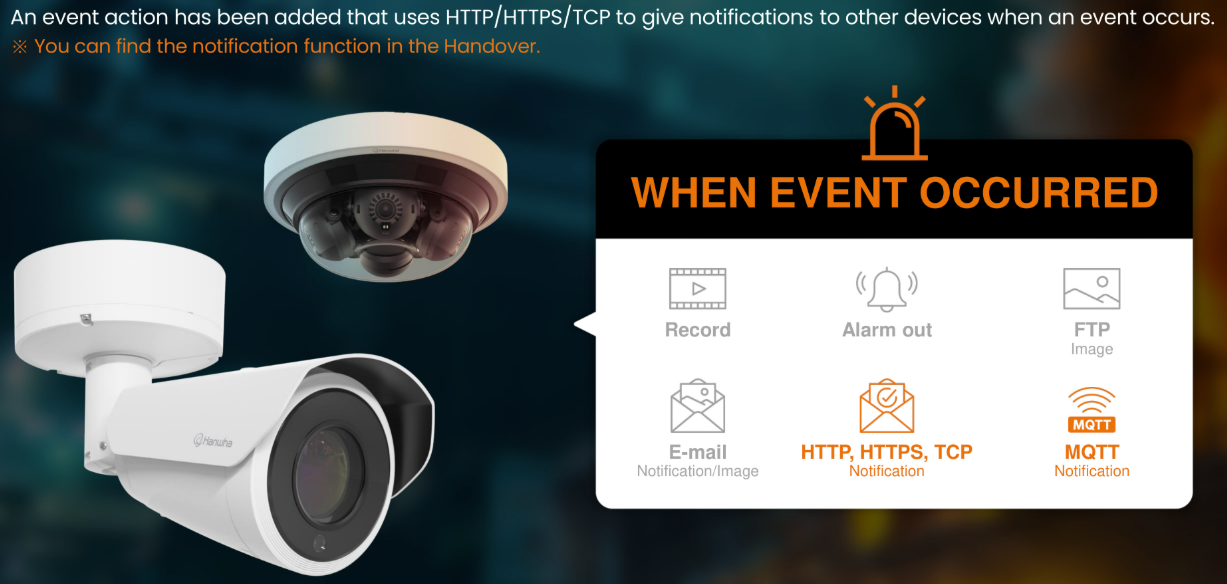
2. Notifications that reach a human
Events become push notifications on the WAVE mobile app (tap-to-view jumps straight to the camera), email alerts with event snapshots, and custom integrations via HTTP. Rules decide who gets notified — see user management — so night staff hear about the loading dock, and the owner hears about the front door.
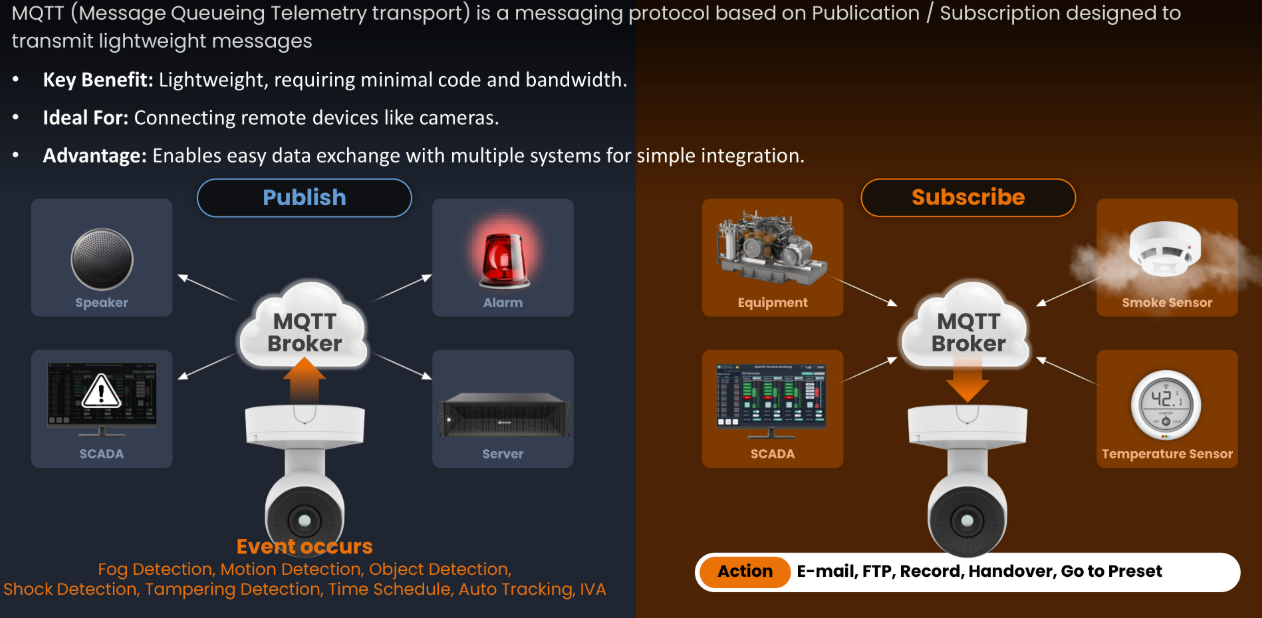
3. MQTT: events for machines
MQTT is the lightweight publish/subscribe protocol that smart buildings and automation platforms speak. Hanwha cameras include a built-in MQTT client: give it a broker address, credentials, and transport (plain TCP, TLS, or WebSocket), and the camera publishes its events — detections, analytics triggers, statuses — to the broker.
Anything subscribed to those topics can react: building-automation dashboards, home-automation platforms, custom logging pipelines, alarm panels. Your camera events become just another data source in the building's nervous system.
Security note: TLS transports and client certificates are supported, so event streams can be encrypted and authenticated end to end.
4. ONVIF: no lock-in
ONVIF is the industry's interoperability standard for IP video. Hanwha's current camera lines are ONVIF conformant to Profiles S, G, T, and M:
- Profile S — live streaming and PTZ control (the baseline every VMS needs)
- Profile G — recording search and replay across systems
- Profile T — advanced video streaming (H.265, better imaging control)
- Profile M — analytics metadata streaming (object data for third-party systems)
Hanwha recorders themselves are ONVIF conformant in the client role — they can consume third-party ONVIF cameras.
Bottom line for buyers: Hanwha hardware works with other vendors' management software — and other vendors' cameras work in Hanwha systems. You're never locked into one brand's ecosystem, and conformance is verified on the official onvif.org product database per model and firmware.
Why profiles matter to you
- Keeping an existing VMS? Hanwha cameras will most likely drop in.
- Keeping Hanwha cameras but changing VMS later? They come with you.
- Mixed fleets? Hanwha recorders and WAVE handle third-party cameras natively.
5. POS text-in-video
Retail sites can stream receipt data from point-of-sale terminals into the recorder (up to 64 devices, standard network text-in protocol with receipt start/end markers), where it's overlaid on the matching video and made searchable — every transaction a clickable event with the camera moment attached. Full details: POS text-in-video on the NVR page.
6. Third-party VMS plugins
Already running a different video management platform? Hanwha publishes official device plugins for the major platforms — Genetec Security Center, Milestone XProtect, LenelS2 OnGuard, AMAG Symmetry — plus integrations through open standards. These plugins surface Hanwha-specific capabilities (analytics events, PTZ, metadata) instead of settling for generic ONVIF behavior.
Developers: Hanwha exposes SUNAPI (its native device API), ONVIF, MQTT, and a free WAVE SDK — enough surface for custom command-and-control builds (we've used it exactly that way on our trailer systems).
Integration checklist
- Existing VMS? → official plugin or ONVIF
- Automation platform? → MQTT or HTTP events
- Custom app? → SUNAPI / WAVE SDK
- Cloud analytics? → SightMind & OnCloud