
Internet & WiFi Installation Summary
(Installed in Tucson 2025)
System Planning
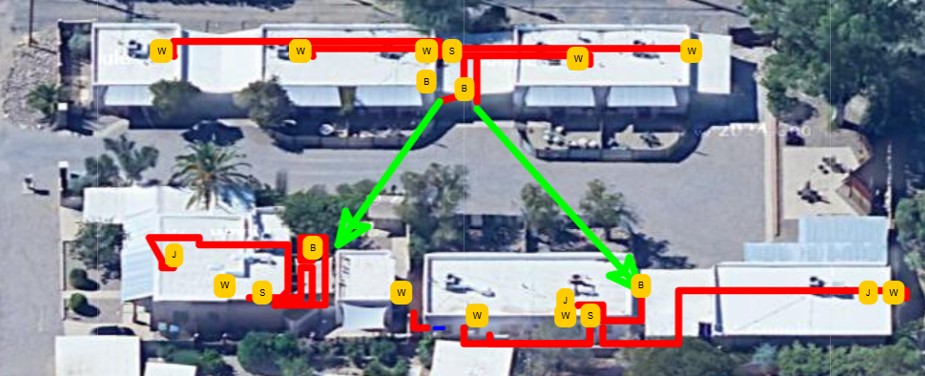
Comprehensive system planning is essential for successful multi-dwelling network installations. Our planning process includes mapping optimal wiring paths and strategically selecting WiFi access point locations to ensure complete coverage throughout the property. When the ISP entry point requires relocation, we coordinate the new Main Distribution Frame (MDF) location to accommodate the network infrastructure. In areas where direct cabling is not feasible, we implement wireless bridges to provide reliable network connections between buildings, ensuring seamless connectivity across the entire property. The Tucson ISP options are confirmed and evaluated. Since this was a multi ISP solution with failover, multiple Tucson providers are vetted and the best ISPs are selected based on the property owners requirements.
System Grounding & Surge Protection

Proper system grounding and surge protection are critical components of any outdoor network installation. We install comprehensive lightning and surge protection systems to help dissipate voltages from nearby lightning strikes, protecting valuable network equipment from electrical damage. All shielded Cat6 Ethernet cables exposed to outdoor antenna locations are connected to Ethernet surge protection devices, which are properly connected to earth ground. Additionally, all shielded Ethernet cables, network devices, and equipment cabinets are connected to both electrical ground and earth ground, providing multiple layers of protection against electrical surges and static discharge. Potential lighting storms in the Tucson area should be considered for proper grounding.
Network Equipment Installation
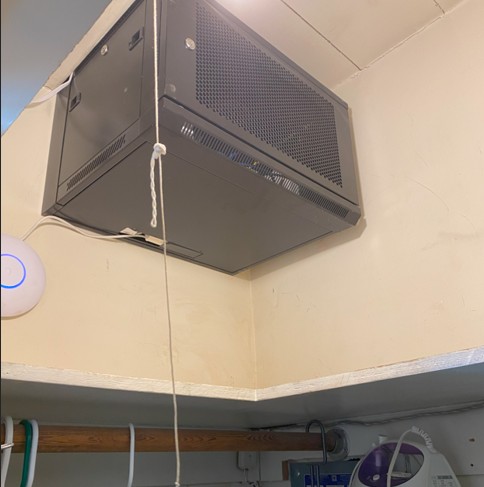
Professional network equipment cabinets are installed at both Main Distribution Frame (MDF) and Intermediate Distribution Frame (IDF) locations throughout the Tucson location. These secure, locked cabinets house all network switches, routers, and related equipment, keeping them protected and organized. The cabinets are strategically positioned to minimize cable runs and optimize network performance while remaining out of reach from guests and unauthorized personnel. This centralized approach ensures easy maintenance access for network administrators and property managers while maintaining security and professional appearance.
Professional Cable Installation
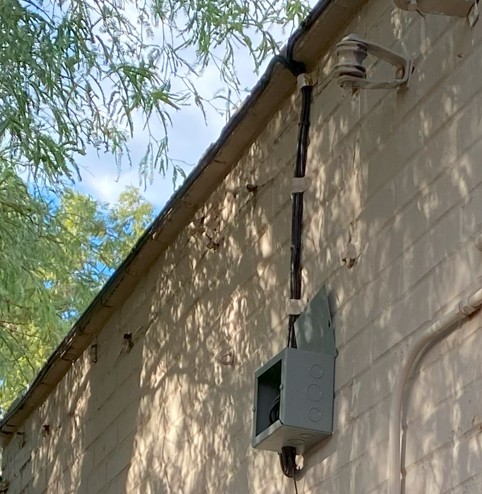
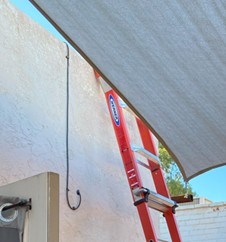
All network cables are professionally installed along the rear exterior of buildings, keeping them out of sight and protected from environmental exposure. We use outdoor-rated, shielded Cat6 Ethernet cables that are designed to withstand harsh weather conditions. Drip loops are always incorporated into the installation to prevent water from entering the building through cable entry points. It is important that Tucson weather conditions are considered (Tucson extreme UV as well as Monsoon rains) for the wiring installation and building protection. Importantly, we never allow roof penetrations, ensuring the building envelope remains intact. All entry points are properly sealed with grommets and high-quality sealant to prevent moisture ingress and maintain weatherproof integrity.
Hardwired Network Jacks
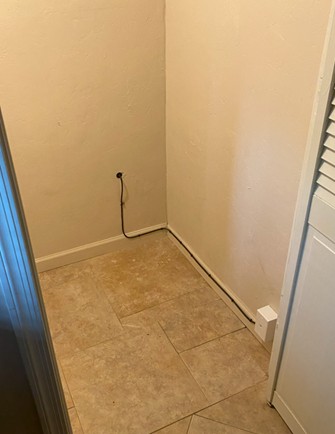
Hardwired network jacks are installed in strategic locations throughout the property to provide reliable, high-speed wired connections for residents. These jacks offer superior performance and stability compared to wireless connections, making them ideal for bandwidth-intensive applications such as video streaming, online gaming, and remote work. Each jack is professionally terminated and tested to ensure optimal signal quality and performance. The installation follows industry standards for cable management and termination, providing residents with dependable network connectivity.
Site Cable Cleanup
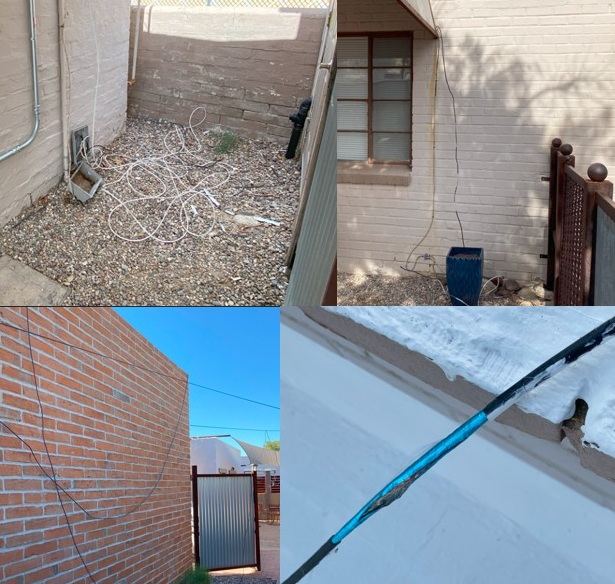
Many properties have accumulated many unusedcables from previous satellite, cable, and internet installations, and often times those cables are no longer in use. These abandoned cables often hang from buildings, creating an unsightly appearance and potential safety hazards. As part of our installation process, we can conduct a comprehensive site cleanup, removing all unnecessary and unused cables throughout the property. This not only improves the property's appearance but also eliminates potential interference sources and reduces maintenance complexity. The result is a clean, professional installation with only active, properly installed cables remaining. Since this Tucson property was being remodeled, a wiring cleanup was desirable.
Network Configuration & Management
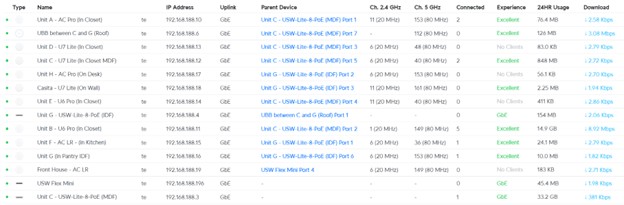
All network devices are monitored and controlled through the UniFi management portal, providing comprehensive network visibility and control. Property owners can access this portal to view device health, monitor user connections, and adjust network settings as needed. These statistics can be accessed from anywhere and from a cell phone app if needed. There is no need to be at the Tucson location to access the informatoin. The router is configured with dual Internet Service Provider (ISP) connections, providing redundancy and automatic failover capabilities. When the primary ISP fails, the system automatically switches to the secondary connection, ensuring continuous service availability. Additional automated features include email alerts for critical events such as high temperature conditions, device failures, or network anomalies. A technician may be sent to evaluate the on-site condition.
Comprehensive System Testing
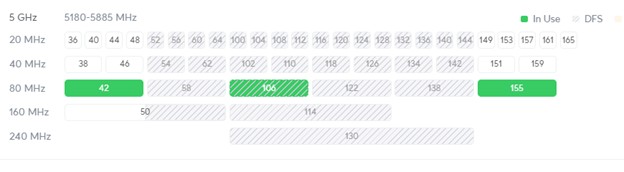

Thorough system testing ensures optimal performance before deployment. WiFi frequencies are analyzed to identify overlapping channels and potential interference sources. Some areas of Tucson might have more interference than others. Each wifi system is adjusted on a case by case basis. Individual access points are fine-tuned to maximize performance and minimize interference. Comprehensive speed tests are performed from every location throughout the property to verify consistent high-speed connectivity. During testing, we consistently achieve speeds exceeding 700 Mbps with ping times under 6ms to each unit. While the system will be rate-limited for normal operation, it's essential to verify that the core infrastructure operates at peak performance. Any deficiencies identified during testing are addressed before final deployment to prevent performance issues during normal operation.
Performance Optimization & Rate Limiting

To prevent individual users from consuming excessive bandwidth and impacting other residents' experience, we implement intelligent rate limiting through the UniFi controller and Mikrotik router. This allows property owners to set maximum WiFi speeds per user or device, ensuring fair bandwidth distribution across all residents. Rate limiting can be configured globally or on a per-user basis, providing flexibility to accommodate different service tiers or usage requirements. In this case the rate limit was applied to all users at this Tucson location. This ensures that all residents receive consistent, reliable internet performance regardless of individual usage patterns, maintaining quality of service for the entire property.
System Monitoring & Automated Alerts
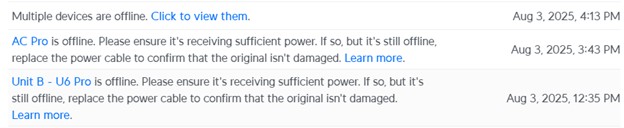
Continuous system monitoring and automated alerting provide proactive network management capabilities. The monitoring system automatically generates alerts for various types of system issues, enabling rapid problem diagnosis and resolution. In many cases, network administrators can be notified of potential problems before end users even notice any degradation in service. These alerts cover a wide range of conditions including device failures, connectivity issues, performance anomalies, and environmental concerns such as temperature fluctuations. In some cases a local Tucson technician will be dispatched to resolve the issue. This proactive approach minimizes downtime and ensures optimal network performance, providing property owners with peace of mind and residents with reliable connectivity.